Builds / recipe
Build your own workout challenge
A 30-day home workout challenge with a full-screen interval timer, a daily check-in and a weekly summary. The build takes into account your equipment and sets appropriate goals, and generates video links for each exercise so you can check proper form. Everything runs on time, so you can leave the phone on the floor and just do the thing.
- Status
- Basic, needs work
- Size
- Small build
- Runs in
- a Claude chat that can publish Artifacts
Try a default build (every answer left at "keep default"; opens on claude.ai)
What it will ask you
- What's the goal, and which part of your body gets the focus?
- How long are your sessions, and how many days a week?
- Any injuries or conditions to work around?
- What do you want to track: steps, water, mood, sleep, weight?
About a dozen questions in all, each with a default, so "keep default" always works. Every answer stays editable in the app afterwards.
What's already decided
- Everything is time-based, so you never touch the phone mid-workout.
- Missing a day is normal: no streaks, no penalties, no catch-up.
- Every exercise shows an easier version, always.
- Tracking is private and optional, with no calorie targets.
Before you start
- You need
- A Claude account that can publish Artifacts.
- Usage
- A light build. The app itself never calls Claude.
How to use it
- Copy the recipe with the button below.
- Paste it as the first message in a new Claude chat.
- Answer the questions, say yes to the plan, and Claude builds it.
Read the whole recipe
/anthropic-skills:grill-me
Build me a guided 30-day workout challenge tracker (a plan, a full-screen interval timer, a daily check-in and a weekly summary) as a claude.ai Artifact, tailored to me. The rest of this message describes the app. Interview me first, then write the spec, get my yes, build, and check the result against the spec.
If the grill-me skill is not available, run the same process yourself: ask the interview questions below a few at a time, write a short spec with acceptance tests, wait for my yes, then build.
0. Check before the interview
The app needs Artifact publishing and the runtime capability artifact (the page republishes itself to save my progress). Load the artifact-capabilities and artifact-design skills. If the Artifact tool or this capability is missing, stop now and tell me, before asking any questions. Where these skills disagree with an API detail in this message, follow the skills.
1. What to ask me
Keep to about 12 questions. Offer a default for each so I can answer quickly with "keep default". Sections 2 to 7 are already decided, so do not ask about them.
Every answer becomes an editable default in Settings (a field, slider, toggle or list), never a constant hard-coded in logic. Anything you decide for me without asking goes in the spec as an assumption and is also editable in Settings.
- My goal (default: general fitness; other options: weight loss, strength, energy).
- My focus (default: glutes and core; offer other focus areas, and if I pick one, you write a matching Day A and Day B exercise set in the same format as section 3).
- Challenge length and weekly rhythm (default: 30 days, 5 workout days and 2 stretch days per week).
- Session length (default: 20 minutes).
- My fitness level and equipment (default: beginner, no equipment).
- Injuries, limitations or health conditions to work around, such as knees, back, pregnancy, heart or blood pressure (default: none). Treat these as "always avoid or use the easier version" entries. This question never merges into another one.
- What I want to track (default: steps, water, mood, energy, sleep and weight, each switchable).
- Water bottle size and daily goal (default: 400 ml bottles, 5 per day, 2.0 L).
- Language, units (kg or lb, ml or oz) and number format, which you ask and never assume.
- Step bands for the daily check-in (default: under 5k, 5k-10k, 10k-15k, 15k-20k, 20k+).
- Weekly weigh-in on or off (default: on only if my goal is weight loss).
- A name for the app and a visual mood (default: "30-Day Core & Strength Challenge", warm and friendly; "you pick" is valid).
2. Core rules
- Everything is time-based. No rep counting. Each exercise runs for a set time, so the timer drives the whole session and I never have to touch the phone mid-workout.
- Missing a day must feel normal. I can tap any day done or not done, in any order. No streaks, no penalties, no catch-up logic. A low-energy day still counts if I do the easier versions.
- Every exercise has an easier version. It is always shown, never hidden behind a setting.
- Safety first. This is not medical advice. Show a notice on first launch that I must acknowledge, and again in "How it works": check with a doctor before starting if I have injuries, pregnancy, or heart or blood-pressure conditions; stop on sharp pain ("a strong pull is fine, pain is not"). Exercises I listed in question 6 default to the easier version or a swap.
- Tracking is private and optional. Each tracked item can be turned off. The weigh-in has a skip option and a note: weigh once a week, same day, in the morning; the trend over weeks counts, not single values; skip it if it stresses me. No calorie targets, no diet prescriptions.
- The weight-loss note ("food, daily walking, protein and sleep matter most for weight loss; workouts shape your body and keep your muscle") shows only if my goal is weight loss.
3. The plan and the session
Plan. Days are numbered 1 to N in weeks of 7. Day types are A (focus exercises, glutes by default), B (core plus cardio) and S (stretch). In a default week the last two days are S and the five workout days alternate A and B strictly across weeks, so one week starts A,B,A,B,A and the next starts B,A,B,A,B. A final partial week simply stops early.
Workout session (A or B), about 20 minutes. Start with a 10-second get-ready step, then:
- Warm-up, 3 minutes: marching in place, leg swings, hip circles, 60 seconds each.
- Circuit: the 7 exercises of the day, twice. Work/rest is 40/20 seconds in weeks 1-2 and 45/15 from week 3 on (starting points, editable). There is no rest after the final exercise. Use the week of the next undone day.
- A 10-second get-ready step, then a cool-down of 4 stretches at 45 seconds each.
Session length setting. The circuit scales by rounds: 15 minutes is 1 round with a shorter warm-up (2 exercises), 20 minutes is 2 rounds, 30 minutes is 3 rounds. The cool-down stays at 4 stretches. All of this is editable in Settings.
Other challenge lengths. The A/B alternation simply continues and the last week stops early. The progression advice stays tied to weeks 1-4, and later weeks reuse the week 3 timing.
Stretch session (S), about 21 minutes. Nine stretches, 60 seconds each, two rounds, with a 10-second get-ready step before each. Display this duration by computing it from the real step list, never as typed text.
Exercises (write a one-sentence how-to and an easier version for each; I list the easier idea where it is not obvious):
- Day A: glute bridge, squat (easier: sit down onto a chair), reverse lunge, donkey kicks, fire hydrants, side-lying leg raise, single-leg glute bridge (easier: two-leg bridge).
- Day B: dead bug, plank (easier: knees down), bicycle crunch, mountain climbers (easier: hands on a sofa), side plank (easier: bottom knee down), squat to kick-back, jumping jacks (step-jacks as the quieter option).
- Stretches: kneeling hip flexor stretch, figure-4 stretch, pigeon pose (easier: figure-4), seated hamstring stretch, child's pose, cobra (easier: forearms), butterfly stretch, standing quad stretch, doorway chest stretch.
- Cool-down after A: kneeling hip flexor, figure-4, standing quad, butterfly. After B: cobra, child's pose, seated hamstring, doorway chest.
Sides. Donkey kicks, fire hydrants and side plank do one side per round (left in round 1, right in round 2; show this as a cue). Side-lying leg raise, single-leg bridge, leg swings and every one-sided stretch switch sides at the halfway point of their time, with two beeps and a flashing "Switch sides now" cue. Hip circles show "Change direction now" at halfway.
Progression advice (text only, not wired into the timer, besides the week 3 timing). Week 1: learn the form, move slowly. Week 2: take 3 seconds on the lowering part. Week 3: 45/15 timing. Week 4: add weight (backpack or water bottles) or use harder versions.
4. Screens
- Home: a Today card (big day number, day type, a one-line description, buttons Start, Mark done and See exercises), a progress bar with "n of 30 days" and percent, then the daily check-in, the 30-day grid, the exercise browser, the weekly summary and a Reset button (with a confirm step). When all days are done, show a celebration instead of Today.
- 30-day grid: weeks of 7 with week labels, tiles colored by day type, a done state, and an outline on the next undone day. Tapping a tile toggles done.
- Daily check-in: a day selector with previous and next arrows (any day, not just today). Steps (one choice of the bands), water (tap bottle icons; tapping the current count again removes one; show the count and liters), mood (great, good, meh, low, stressed), energy (low, medium, high) and sleep (bad, OK, good). Tapping a chosen chip again clears it.
- Exercise browser: tabs for the focus day, core day, stretch and "How it works". Each exercise shows a small looping animation of its start and end pose with the target muscle highlighted, the how-to, the easier version, and a "Watch video" link that opens a YouTube search for the exercise name plus "exercise proper form" in a new tab. The tabs for A, B and Stretch show a Start-with-timer button and the timing for my current week. "How it works" explains the session format, the progression and the safety notice.
- Weekly summary: one row per week (week 5 covers the leftover days). It shows workouts done out of workout days (stretch days excluded), the most common answer for steps, mood, energy and sleep, average bottles per day over days where water was logged, and a weight field (type a number; a comma decimal works; saved to one decimal). A line chart appears once two weeks have weights.
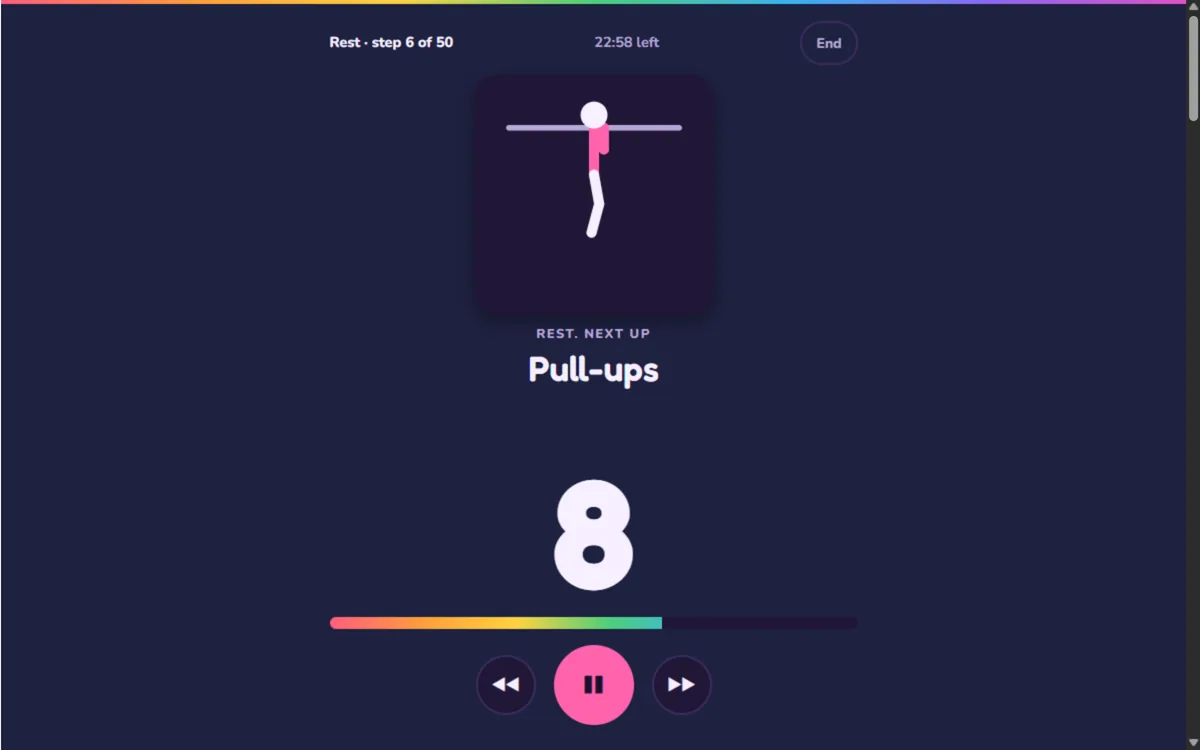
- Timer (full screen): shows the phase, total time left, the animated figure, the exercise name, a cue line, a big countdown and a progress bar. Work steps show the easier version. Rest and get-ready steps name what comes next. Beeps and a vibration at the start of each work and rest step, short beeps for the last 3 seconds. Pause, previous, skip. It keeps the screen awake while running. At the end, a "Great work" screen offers "Mark day N done" only if the session was for the next undone day.
5. Saving
Progress (done days, check-ins, weights) saves to the device on every change and also republishes the page with the state embedded, a few seconds after the last change, and never while a session timer is running. On load, whichever copy (embedded or on device) has the newer timestamp wins. If republishing fails, show "Saved on this device only". Start with a blank state: no days done and nothing logged.
6. Technical
One self-contained page, published privately, capabilities {"artifact": {}}. Develop as separate source files built into a single HTML file: pure logic with no DOM (plan builder, step-list builder, timing by week, side rules, weekly summary), UI and state, and styles. Do not minify, and write a short comment explaining why for every rule and number. Mobile first with 44px tap targets, dark mode, all user text escaped. All numbers above are settings or constants in one place, editable in Settings, including the work/rest times.
7. Definition of done
Write automated tests for the pure logic. Check Node first, and ask me before installing anything. The tests must cover at least:
- the plan: day types for 30 days, alternation across week boundaries, and a final partial week;
- timing: 40/20 in week 2 and 45/15 in week 3, and no rest after the final circuit exercise;
- the session step list: total duration within 20 minutes plus or minus 1 for a default workout and 21 for a stretch day;
- side cues: one-per-round, halfway switch and direction change for the right exercises;
- the weekly summary: stretch days excluded from the workout count, most-common answer ties, and water averaged only over days with a value;
- "Mark day done" in the timer appears only for the next undone day.
Run the page locally and click through every screen at phone and desktop widths, including one full timer run with the durations shortened for the test. If you drive a headless browser, launch it so it never asks for an OS keyring or password (Chromium: --password-store=basic --use-mock-keychain). Never publish a test build with shortened timings. Then publish, and give me the link.
Report plainly what you tested and what you did not (real sound, vibration and screen-awake behavior on my phone cannot be proven in a test browser). Then walk me through a live test: start the first workout and check the beeps, then mark a day done, log a check-in, reload and confirm it persisted. Fix what fails.
Made with the recipe plugin. Back to Builds